- The Dote
- Posts
- The Dote 5: How I used AI to build an app with zero experience
The Dote 5: How I used AI to build an app with zero experience
All to tell me how much money I spend at Costco

Stephen Olson
September 22, 2024
Hey Friends!
Remember how last Dote I listed all the things that have been breaking recently? Well, add Lydia’s arm to the list 😭 She broke it on the school monkey bars while playing at a fundraiser event on Friday evening. We spent the whole night in the ER and have spent the weekend adjusting to her life in a splint.
We’re hoping it wasn’t too bad of a break and that by the end of this week she’ll get a short hard cast. Right now she has a splint that goes all the way up past her elbow. Doctor estimates 6 weeks in a cast, so if that holds then she’ll get it off the day before her birthday.
I feel so bad for her, but she’s a trooper and has bounced back to being her normal, happy, brave, creative self. I’m so proud of her.
And let’s hope this is the end of our unlucky streak!
A creative Dote: My FOMO with AI
I have been feeling behind the curve on everything AI related. The main things I’ve used ChatGPT so for are Excel help and…*checks history*…giving me a punny Fantasy Football team name.
I’ve seen gobs of content that make it look like ChatGPT does everything perfectly, just like a human would, but I’ve never been able to get the same results.
I’ve also never done anything with code in my life, but always wanted to. The closest I have ever come to coding is either when I took the first three lessons of a Codeacademy course back in college, or at my first job when I pretended to know R programming so I could get put on a consulting project. (Still can’t believe someone paid my company tens of thousands of dollars for me to pretend to know R.)
I know so little about coding that even just thinking of something to code has been overwhelming. It’s hard to imagine something with absolutely no framework for how it works.
Have I adequately set the stage for how little I know about code and AI? Good. Because more important to me than what I built this week is the accomplishment of actually trying something.
Freeing myself to be creative without expectation has been thrilling, and allowed me to build my first ever application.
So what inspired me? Trying to find out how much I spend at Costco 😂
I used ChatGPT to build an app that reads and itemizes all my Costco receipts this year and summarizes the data into an Excel spreadsheet.
The experience blew my mind both because of what AI is capable of and also what it told me about my Costco spending, so I want to write in-depth about both.
Getting the idea
Two weeks ago while looking through my budgeting app with Han I commented that I wished I knew what we bought at Costco. We use Copilot for budgeting, which we like, but it can’t itemize the products in a transaction.
After some quick Googling, I learned that Costco saves a copy of the receipt to your account for every transaction you make on your membership card. It’s literally a digital image of your receipt, which you can download and save as a picture.
For whatever reason, I decided to upload a file to ChatGPT and ask it to make me a table with the item, the price, and the amount.
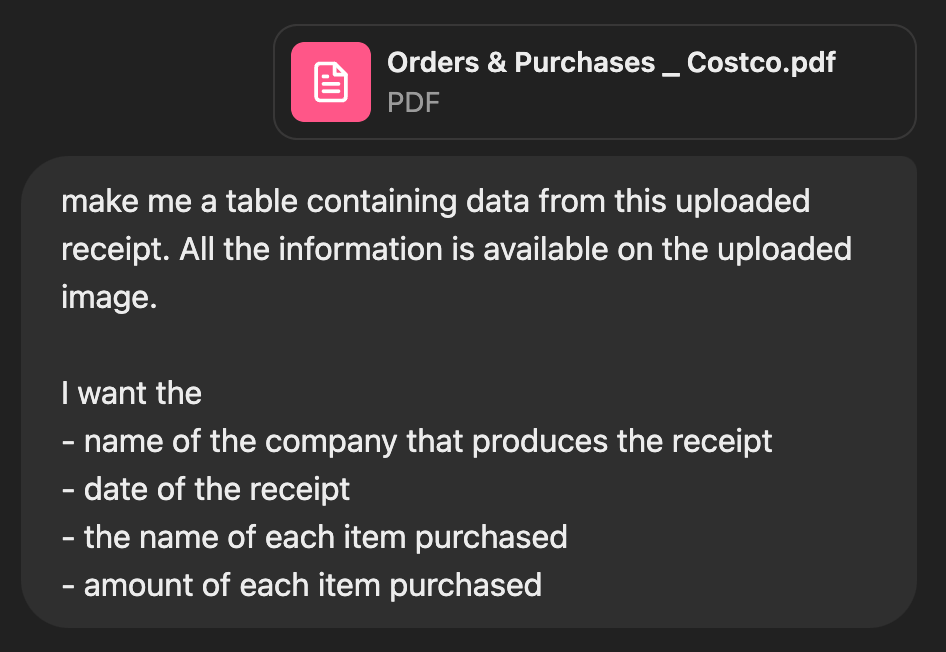
Why didn’t I ask for price? Duh
To my surprise, the data it came back with was pretty good. Unsurprisingly, my original prompt was not very good. I revised, tried again, and was impressed with the results.
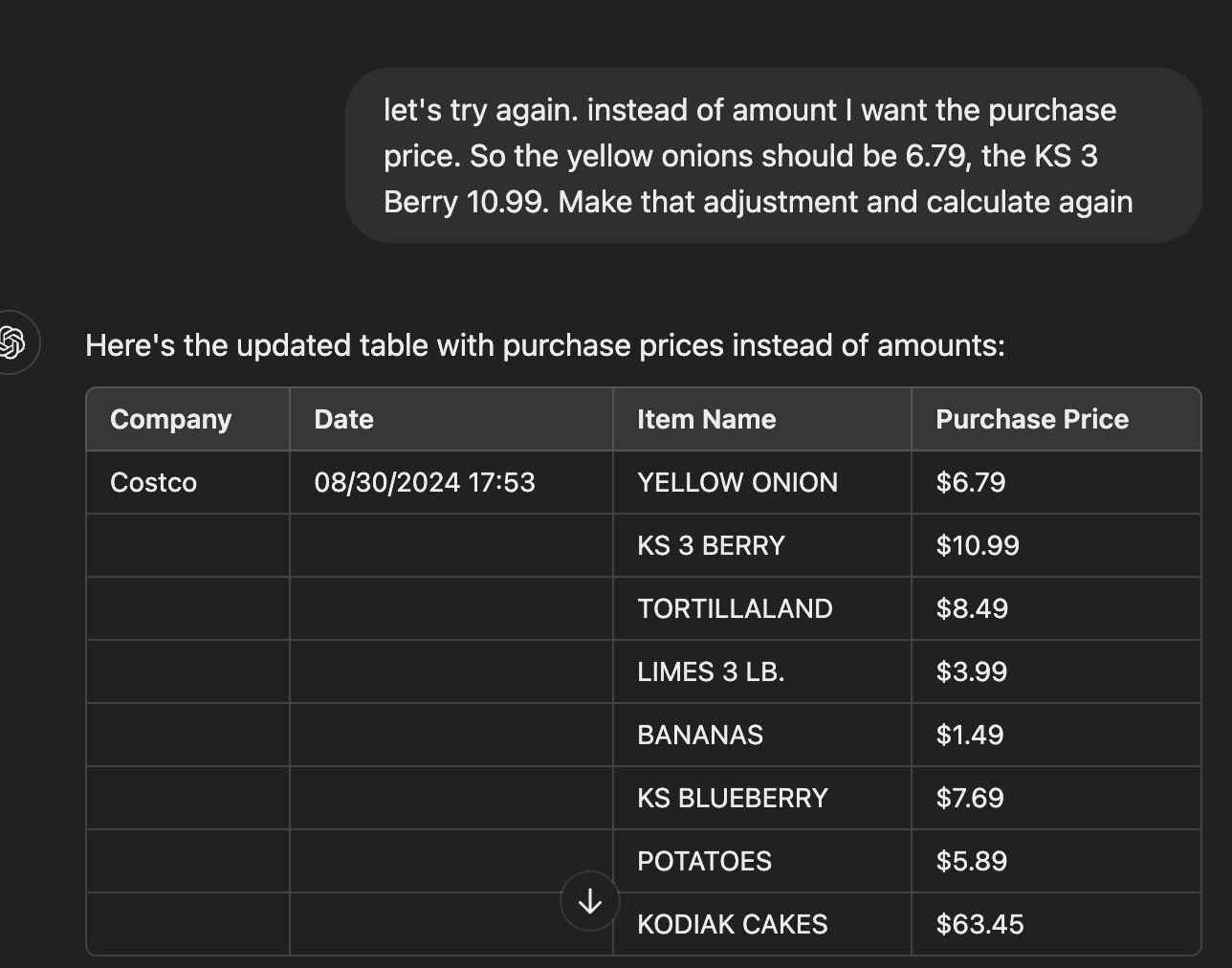
Not a bad start, but too much empty space
With a few more iterations I got a table that showed me the Store Location, Date, Item Name, and Purchase Price. I also entered some logic that helped it recognize patterns on the receipt so it could recognize when something was a discount. At the end, it analyzed two images and gave me this.
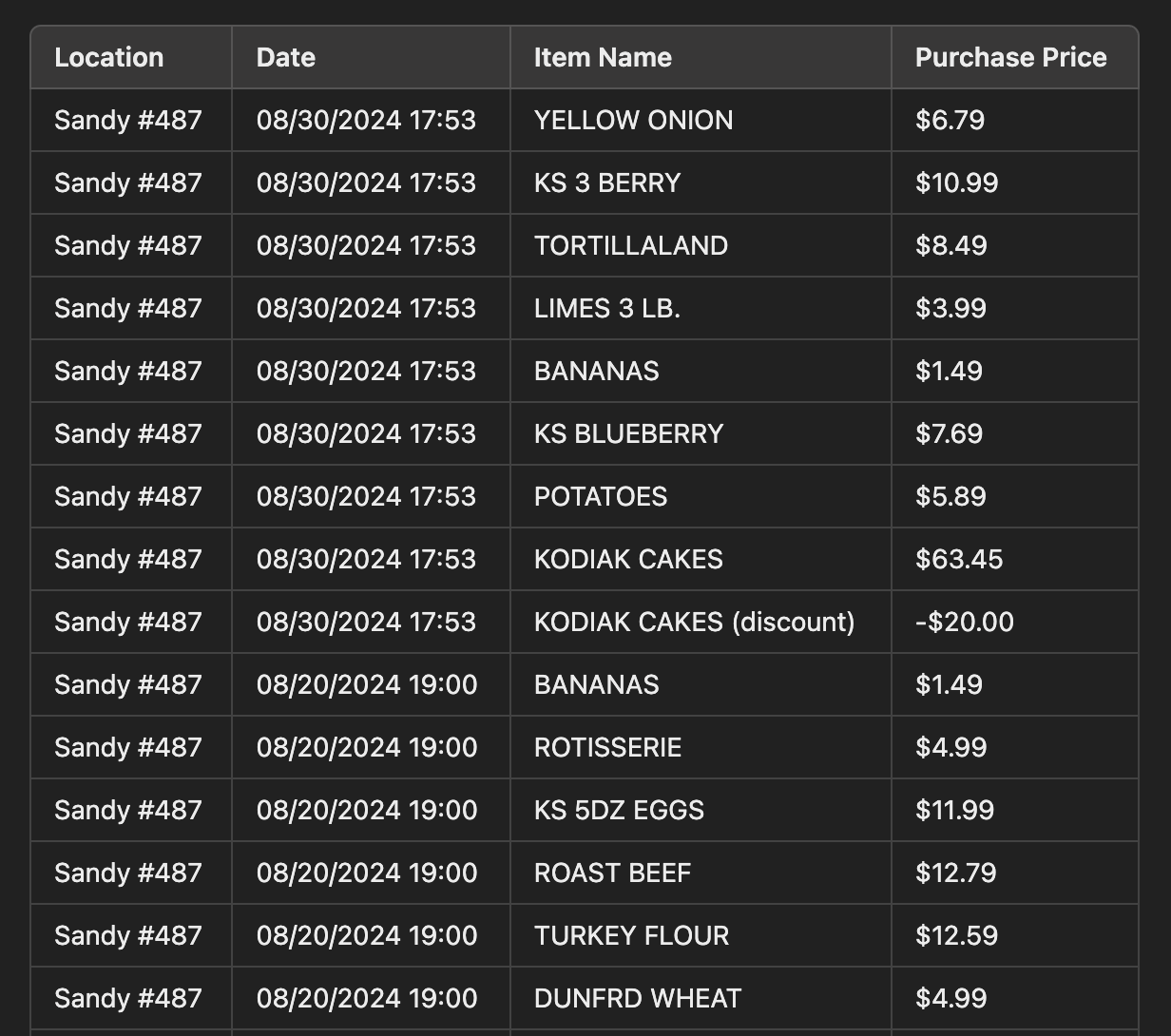
It captured a different date AND the discount!
At this point, I was ready to go all in. I uploaded three more files to read and…promptly got hit with a limit. Turns out ChatGPT has a lifetime limit of 10 files. I was devastated. Just as I was finding something cool to do with AI!
While scouring the internet to find another way to read all my Costco transactions, I came across a Reddit thread that suggested using a plugin to scan a file on your computer to bypass the file upload limit.
And that’s when it hit me.
What if I could save all the receipt images to Google Drive and create an app that connects with it, scans them, and gives me all the data. And even better, what if I could have ChatGPT tell me how to built it?
Starting to code: where do you put it?
I had no idea where to start, so that was the first question I asked my new AI teammate. I’d run out of messages on ChatGPT until the morning, so I went over to try Claude, which I heard was particularly good at code.
I started out with the dumbest prompt ever.
I want to build an application that can scan a google drive folder full of Costco receipts, read them, and sort them into a table.
But that’s all it took Claude shot off and gave me a step-by-step guide for getting started, as well as the first stab at code to do it.
Integrate to Google Drive
Implement OCR
Parse the receipts
Choose where to store the data
Build a user interface
That’s when I came to what I thought was my first problem. I didn’t know how to get API credentials. So I asked! How do I get Google Drive API credentials?
It gave me a step-by-step guide with literally every click I needed to make from within the Google Cloud Console interface. I couldn’t believe it, I was off to the races! That is…until I got to the next step, which I realized should have been my real first problem to figure out.
I didn’t even know how to run code on my computer.
Where do I write it? How does it work? How does it know to just…run? Do I save it somewhere? I literally knew nothing.
That’s when I became extremely grateful to be working with AI, because it doesn’t care how dumb I am!
My next question was Where do I go to run the script? to which Claude responded with instructions to download Python (duh), install some libraries, and save some files.
Despite Claude’s good directions, I was quickly getting way out of my depth. I had a couple problems figuring out where put the code, and after going back and forth with AI I realized I was spinning in circles, so, I called on my good buddy, T!
T has done a bunch of his own cool side projects while also working for Google and a biomedical engineering company called Lumea. He was kind enough to help me figure out how to download Visual Studio Code and get started, thanks T! If this app becomes worth anything (it won’t) you deserve about as much credit as I do (AI really did everything).
Building the app
By the time I got everything going in Visual Studio I’d run out of Claude messages and had to go back to ChatGPT. Incredibly, I was able to copy my code out of Claude, paste it into ChatGPT with an explanation of what I was trying to do, and it immediately got to work in the same spot I’d been.
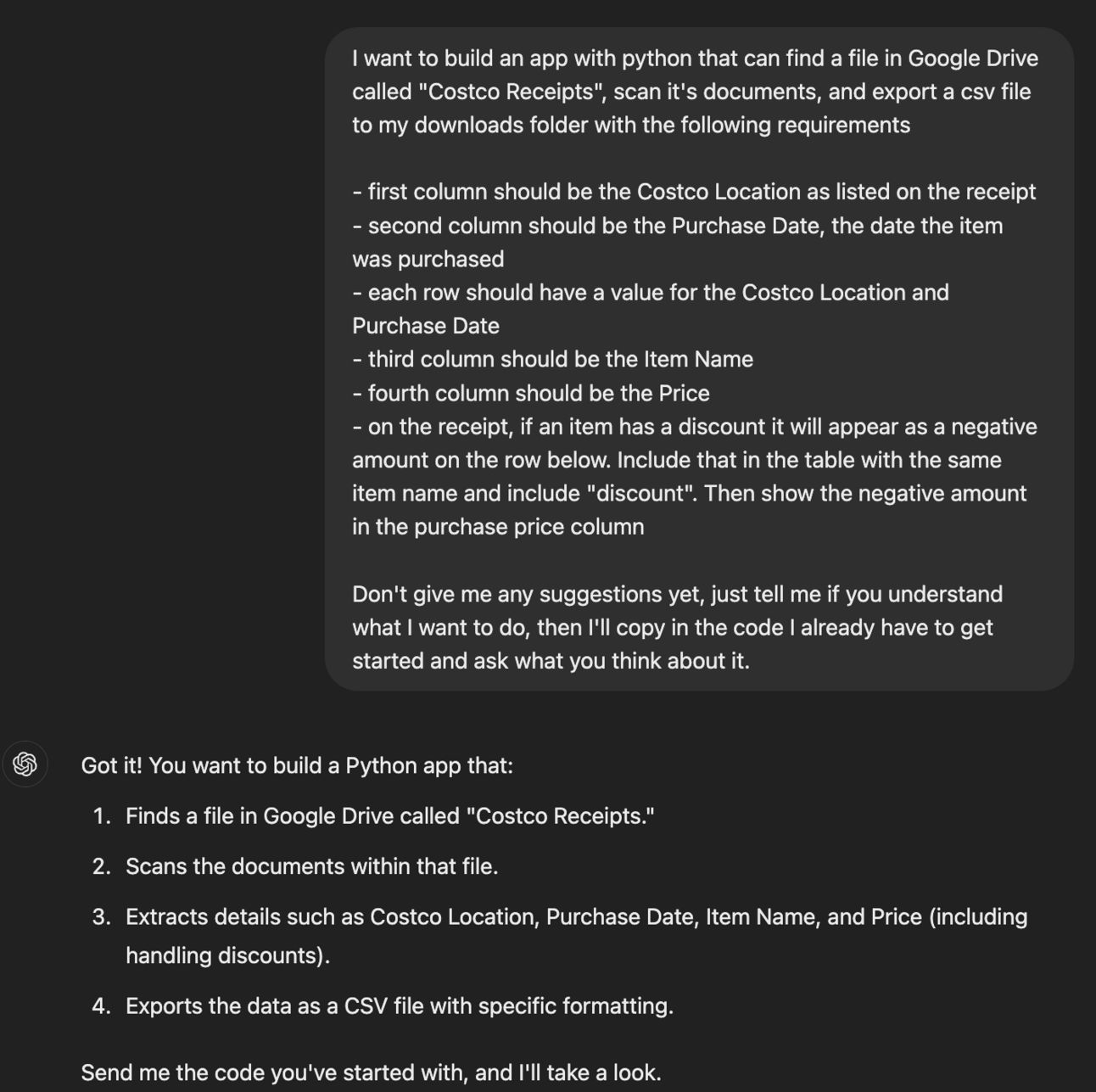
Picked up right where I wanted
This is where it becomes challenging to explain how magical everything started to feel. I began having a legit, back and forth conversation with GPT. It would give me code, tell me what it did and what to do. I would copy the code, run it, bring back errors, and it would tell me how to fix them or just write me new code.
I seriously felt like Tony Stark working in his basement lab, building out his Iron Man suit.
I quickly realized that because I don’t understand anything about Python, troubleshooting the code was time consuming. I tried having GPT tell me the specific lines of code to replace and what to replace it with, but I still screwed things up a couple times.
What I ended up doing was just having GPT make the change, then give me the entire re-written code again so that I could delete everything and copy/paste the new version. This meant I quickly ran out of free messages, but at this point I was so sucked into the magic that I justified spending $20 for the month.
In the words of Dexter’s Laboratory, “What a fine day for science!”
I worked back and forth with GPT on a number of unanticipated challenges like
how to scan multiple files
figuring out the files were images and need to be converted to pdfs for OCR
installing tons of package managers and the Tesseract (Avengers reference, anyone?)
where to store the data and how to present it
what calculations to do
how the parser should interpret the receipts (multi-lines and discounts follow different formats and are challenging). We went back on this FOREVER
I know I’m not doing it justice, but this experience blew. My. Mind. I don’t understand how something this incredible can exist, and it’s only a few years old! Think of what it will be able to do in a few more years! It could completely eliminate the barrier to entry for idiots like me to build all kinds of applications. And for the people who actually know what they’re doing? Sheesh, they’ll be able to do anything.
The final result: My Costco spending REVEALED
If you’ve made it this far, it’s only because you want to know what I spend at Costco, so I won’t keep you any longer.
I finished the app, but it’s not perfect, and it’s certainly not polished. I tried to make it publicly available, but that requires a whole bunch of other stuff that is probably obvious to coders, but not to me, and I didn’t have the time. So you’ll just have to live with my results for now, and if you want to know you’re own then you can send me a file of all your Costco receipts, haha.
What the app does is connect to my Google Drive, scan for a folder titled “Costco Receipts”, read everything there, and put it into an Excel spreadsheet with two tabs. On one tab is all the raw data, and on another is a summary that calculates the total amount I’ve spent per item and the number of times I’ve purchased it.
Behold, my top 10 items at Costco so far in 2024!
Rank | Item | Number of times purchased | Total amount spent |
|---|---|---|---|
1 | WHOLE MILK | 36 | 1,177.04 |
2 | 87745 ROTISSERIE | 30 | 164.67 |
3 | BANANAS | 25 | 68.54 |
4 | CHANGE 0 (A) A | 25 | 83.95 |
5 | NAAN BREAD | 21 | 198.09 |
6 | TORTILLALAND | 21 | 178.29 |
7 | STRA WBERRIES | 19 | 83.99 |
8 | AVOCADOS | 18 | 126.80 |
9 | COTT AGE CHSE | 15 | 101.83 |
10 | KODIAK CAKES | 13 | 786.78 |
11 | TRI TIP STK | 13 | 498.78 |
That’s right, I have spent $1,177.04 on WHOLE MILK so far this year. Followed only a couple hundred dollars behind by $786 of Kodiak Cakes.
Now, the Kodiak Cakes number isn’t perfectly accurate as this line item isn’t accounting for discounts. There were still some kinks I gave up on working out in the code.
I only buy Kodiak Cakes when they’re on sale, so there’s a -$140 rebate hiding a little farther down the Excel sheet that would net this out to a much more respectable $646 of pancakes.
You can easily tell what our regular purchases are. Milk, bananas, rotisserie chicken, naan, tortillas, strawberries, and avocados. Tri-tip steak has been a frequent item this year as it’s delicious and easy to cook in the air fryer. Do you have any idea how much cottage cheese 15 tubs is? One tub is 3 pounds, so we’re talking about 45 pounds of cottage cheese! That’s all Hannah, she sneaks it into everything, haha.
Maybe one day I’ll figure out how to make this app more public, but I have no idea if it would even be useful, so I probably won’t sweat it too much. What matters to me is that I had a great time being creative with something I’d never done before. Once I took off the pressure for my first attempt to be something amazing, I was able to have a lot of fun.
You should have seen me, I was giddy with excitement every time I tried a new iteration of code. I finally understand why programmers get addicted to building things.
I still know nothing about coding, but I’ve already got some ideas for the next things I want to try. I do have a whole month on my new GPT subscription, after all.
If you want to view my entire conversation with GPT you can see it here.